Build your SBIR cost volume faster, without second-guessing your numbers and getting timed out of DSIP
Fillable SBIR Cost Volume Builder
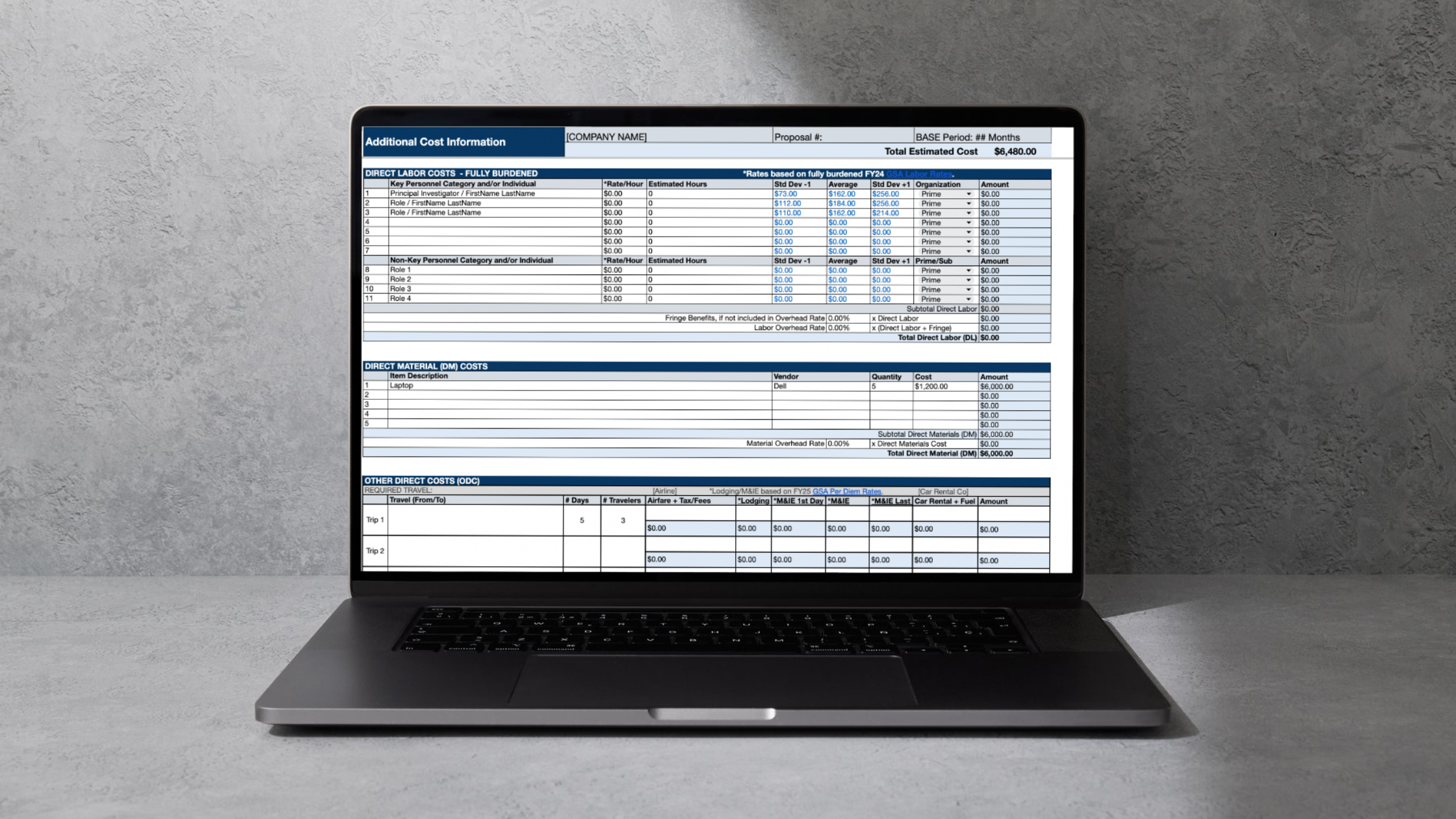
A fill-in-the-blank Excel budget calculator and walkthrough video for small businesses that need to build a compliant SBIR or STTR cost volume without getting stuck in formulas, formatting, or cost confusion. Everything from DSIP, but in a sharable document, with guidance and formulas that make sure your math maths.
Create your cost volume in minutes, not days.
Use the fillable spreadsheet, follow the walkthrough, and confidently organize labor, materials, subcontractors, indirect costs, and profit in one session instead of days of back and forth.
You’re ready to submit your SBIR or STTR proposal, the budget piece in Volume 3 can quickly become the part that slows everything down. A compliant cost volume requires more than just “putting numbers in a webform” and hoping it comes in under the budget cap; it means showing your estimate clearly across labor, materials, subcontractors, overhead, and profit in a way that holds together when it’s time to submit and doesn’t get you disqualified in the review.
Maybe you’ve found yourself asking:
What exactly belongs in each section of the cost volume?
How do I calculate labor rates?
How should I calculate indirect costs? What’s fringe?
How much is an acceptable profit margin? Am I more likely to win if it’s zero?
How do I turn my working file into a clean final PDF for submission in Volume 5?
If that sounds familiar, you’re not behind, you’re dealing with one of the most tedious parts of the proposal.
But if you’re like most small businesses working on an SBIR or STTR proposal, chances are you:
Know your project scope, but not how to present the budget in a gov-ready format.
Waste time rebuilding formulas or checking the same numbers over and over.
Feel unsure whether your categories, rates, and totals are compliant.
Don’t want to submit a sloppy budget that weakens an otherwise strong technical proposal.
The hardest part isn’t the accounting, it’s the fear of missing something important in a section reviewers expect to be standard.
That’s exactly why we built this tool. The SBIR Calculator is the all-in-one guide and template the entrepreneurs wish they had for their first government proposals, with the goal of helping innovators move from blank spreadsheet to completed cost volume faster and with more confidence.
Instead of piecing together advice from scattered sources, you get one working tool plus guided support content that shows you how to use it.
Because the truth is: if your cost volume feels confusing, shaky, or unfinished, it can create unnecessary risk of getting disqualified on a technicality. A messy budget slows you down, increases rework, and makes an already stressful proposal process harder than it needs to be.
And when deadlines are tight, “I’ll figure out the budget later” usually turns into last-minute scrambling.
It’s not that your company isn’t capable of building a strong SBIR or STTR budget. It’s that you may not yet have a simple system for turning your project assumptions into a clean, complete cost volume.
When you do have that system, the process gets much easier: you can plug in inputs, review totals with confidence, and move toward submission knowing your budget tells a clearer story. The included walkthrough is specifically framed to help users go from a blank Excel file to a completed cost volume step by step.
That’s exactly why we created the Fillable SBIR Cost Volume Builder
A fillable budget tool and step-by-step walkthrough for SBIR and STTR applicants who need to organize their cost volume clearly, accurately, and efficiently.
This resource is designed to help you build out your cost volume in minutes using a fillable Excel file with formulas, plus supporting guidance that walks you through each step. It is intended to help you move from spreadsheet chaos to a proposal-ready budget without wasting time second-guessing your numbers.
Who We Are
Hi, this is Sofia and Lori-Lee, part of the team behind Intrepid. We used SBIR and STTR contracts to bootstrap our startup and build out dual-use product lines that serve both public sector and private sector. We won a dozen SBIRs/STTRs and are relieved and excited to have moved on to Phase III work. Along the way we created this calculator so we could collaborate on the cost volume with a fully remote team, and with our JV partners, research institute partners, and consultants. We needed a single source of truth for our cost information, that wasn’t on a platform we don’t control (aka, DSIP). We learned the nuances around things like where to find rate information and profit margin best practices the hard way, so we baked it into the calculator so you don’t have to guess like we did. We also found that including a PDF export of the cost volume in Volume 5 makes the evaluators job easier. With the calculator you can get that ready to upload in three clicks. So we’re passing it along to the next wave of SBIR/STTR companies.
What’s Inside
Here’s what you get with the product:
Fillable Excel with formulas: Built to help users go from Excel or Google Sheets to DSIP more easily, with formulas already in place so the numbers stay solid as you work.
Shareable Document: Upload the fillable sheet to Google Drive and easily collaborate with partners and subcontractors.
Step-by-step video walkthrough: Included guidance breaks down each step so you can move from a blank file to a completed cost volume without guessing what to write or where to put it.
Budget structure for key cost categories: The tool walks through labor, materials, subcontractors, overhead, profit rate, and the other questions users need to answer to prepare the cost volume.
Export-ready final output: The product page says you can export the final copy to PDF for upload to the required cost volume section of the proposal.
Instant access: Buyers get immediate download access so they can start building right away.
Build your SBIR cost volume for just $47
When you purchase the Fillable SBIR Cost Volume Builder, you get:
A fillable Excel budget file with formulas to support accurate calculations.
A step-by-step walkthrough video to help you complete each section faster.
Guidance for major cost categories including labor, materials, subcontractors, overhead, and profit.
A document you can export to PDF to include as the “Additional Cost” requirement in Volume 5.
Instant access so you can start immediately.
If you’re a small business preparing an SBIR or STTR proposal, you don’t need another 15 year-old PDF’ed PowerPoint, you need a practical tool that helps you build the budget and move on.
FAQs
Is this for SBIR only, or can STTR applicants use it too?
1
We have a separate calculator for STTR that includes a section for the research institute (RI). See the STTR calculator here.
What format does the SBIR Cost Volume template come in?
2
The product page says the core resource is a fillable Excel file with formulas, and it can be used from Excel or Google Sheets.
Will this help me understand how to complete each section?
3
Yes, every download includes a walkthrough video, and the product page says it breaks down each step so users can complete the cost volume with less guesswork.
5
Can I use the final file in my proposal submission process?
What cost categories does it cover?
4
The calculator covers all the section present in DSIP, including labor, materials, subcontractors, overhead, profit rate, and the questions users need to answer to submit the cost volume.
All proposers must manually enter cost information into Volume 3, natively on DSIP. The template helps you get the right data in the right sections. You can export the final copy of the template to PDF and upload it as the “Additional Cost Volume” requirement in Volume 5.